
| install_ocssw.py | |
Installs or updates OCSSW processing package.
Location
Details
Command Line Usage
OCSSW -> Install/Update OC Processors
<Install/Update OC Processors executes install_ocssw.py which installs or updates the OCSSW package for SeaDAS. When SeaDAS first installs OCSSW package, the menu item would display as "Install OC Processors". Afterwords, it's displayed as "Update OC Processors".
You can access the OCSSW installer GUI from the Tools/SeaDAS Processing/Install/Update OC Processors menu. The ocssw install/update GUI initially displays a default window, as shown in the image below, to select installation directory and mission data files to be included in the installation. If the data files of a mission already exists in the system, the checkbox for that mission would be selected in the initial screen. Users can leave it selected for an update or deselect to skip its installation.
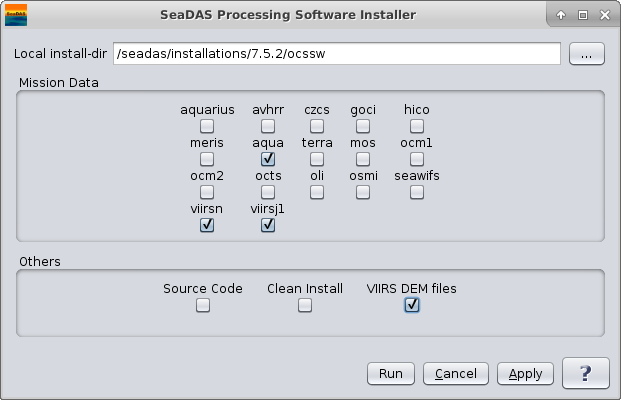 |
| UI Element Name | Type | Description | Required/Optional | Default Value |
| install-dir | text | destination directory for install. Defaults to $OCSSWROOT or "$HOME/ocssw" if neither are given. | Optional. The default installation directory is $USER_HOME/ocssw. | $OCSSWROOT if it exists, otherwise "$HOME/ocssw" |
| aquarius | boolean | install Aquarius files | Optional | false |
| avhrr | boolean | install AVHRR files | Optional | false |
| czcs | boolean | install CZCS files | Optional | false |
| goci | boolean | install GOCI files | Optional | false |
| hico | boolean | install HICO files | Optional | false |
| meris | boolean | install MERIS files | Optional | false |
| aqua | boolean | install MODIS Aqua files | Optional | false |
| terra | boolean | install MODIS Terra files | Optional | false |
| mos | boolean | install MOS files | Optional | false |
| ocm1 | boolean | install OCM1 files | Optional | false |
| ocm2 | boolean | install OCM2 files | Optional | false |
| octs | boolean | install OCTS files | Optional | false |
| osmi | boolean | install OSMI files | Optional | false |
| seawifs | boolean | install SeaWiFS files | Optional | false |
| viirsn | boolean | install VIIRSN files | Optional | false |
| viirsj1 | boolean | install VIIRSJ1 files | Optional | false |
| Source Code | boolean | install source code | Optional | false |
| Clean Install | boolean | do a clean install by deleting the install directory first, if it exists | Optional | false |
| VIIRS DEM Files | boolean | install VIIRS DEM files needed for geolocation | Optional | false |
| UI Element Name | Type | Description |
| Browser Button | Button | Selects installation directory |
| Run | Button | Executes install_ocssw.py with arguments provided in the UI. |
| Cancel | Button | Closes current processor GUI. |
| Apply | Button | Makes current arguments effective. |
| ? | Button | Displays the help content of the current command. |
    Usage: install_ocssw.py [options]

    Options:
      --version             show program's version number and exit
      -h, --help            show this help message and exit
  -v, --verbose         Print more information while running
      -i INSTALL_DIR, --install-dir=INSTALL_DIR
                            destination directory for install. Defaults to
                            $OCSSWROOT or "$HOME/ocssw" if neither are given.
      -g GIT_BASE, --git-base=GIT_BASE
                        web location for the git repositories
  -b GIT_BRANCH, --git-branch=GIT_BRANCH
                        branch in the git repositories to checkout
      -a ARCH, --arch=ARCH  set system architecture (linux, linux_64,
                            macosx_intel)
      -s, --src             install source code
  -l LOCAL, --local=LOCAL
                        local directory containing previously downloaded
                        bundles
  -c, --clean           Do a clean install by deleting the install directory
                        first, if it exists
  --curl                use curl for download instead of wget
  --no-update           do not update the git repositories or luts
  --save-dir=SAVE_DIR   destination directory to save all of the install
                        files.
      --aquarius            install Aquarius files
      --avhrr               install AVHRR files
      --czcs                install CZCS files
      --goci                install GOCI files
      --hico                install HICO files
      --meris               install MERIS files
      --aqua                install MODIS Aqua files
      --terra               install MODIS Terra files
      --mos                 install MOS files
  --msis2a              install MSI S2A files
  --msis2b              install MSI S2B files
      --ocm1                install OCM1 files
      --ocm2                install OCM2 files
      --octs                install OCTS files
  --olcis3a             install OLCI Sentinel 3A files
  --oli                 install Landsat 8 OLI files
      --osmi                install OSMI files
      --seawifs             install SeaWiFS files
  --viirsn              install VIIRS NPP files
  --viirsj1             install VIIRS JPSS1 files
  --viirsdem            install VIIRS digital elevation map (DEM) files
      --direct-broadcast    install direct broadcast files